The Hidden Cost of Sitting All Day
If you spend eight hours a day sitting at a desk, your spine is working overtime—and you might not even feel it yet. Poor desk posture doesn’t announce itself with a dramatic injury. Instead, it creeps up on you through months of small, cumulative strain. Your neck inches forward, your shoulders round inward, and your lower back flattens against the chair. By the time you notice neck pain or back stiffness, your spine has already been compromised.
This is the desk posture trap: a gradual misalignment that feels normal until it doesn’t. The good news is that understanding how your office setup affects your spine—and making simple changes today—can prevent years of chronic pain.
Your Desk Setup Can Create Spine Strain
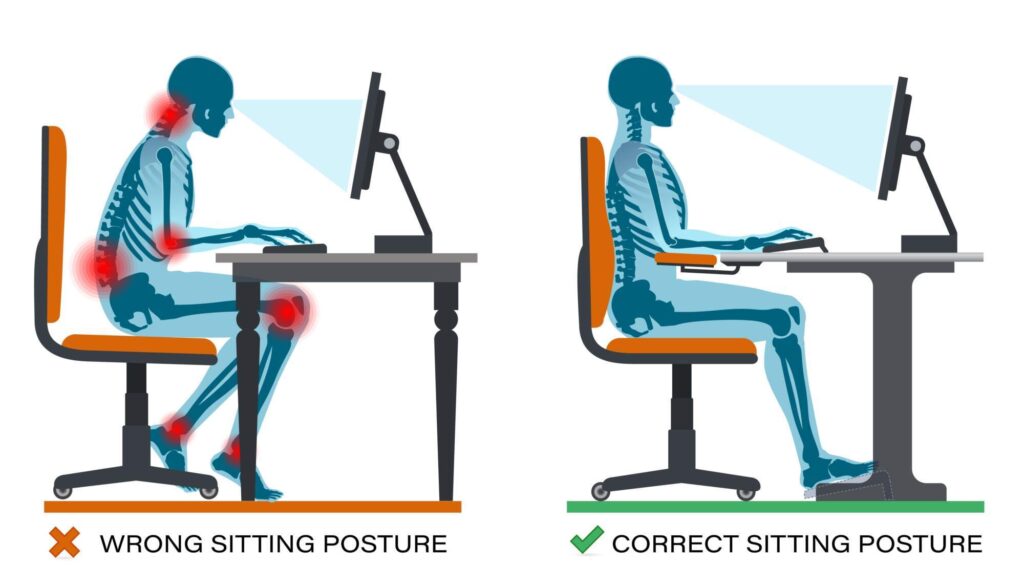
Your monitor, keyboard, and chair aren’t just furniture; they’re posture architects. When your screen sits too low, you instinctively crane your neck forward to see it. When your keyboard is too high, your shoulders hunch up toward your ears. When your chair lacks lumbar support, your lower back rounds into a C-shape, destabilizing your entire spine.
These individual misalignments seem small, but they compound. Each forward head position adds pressure to the joints and discs in your cervical spine. Repeated shoulder tension tightens muscles that should be relaxed. Poor lower back support trains your core muscles to disengage, leaving your spine less stable. Over weeks and months, these patterns become habits—and your body adapts to dysfunction.
The result is chronic tension, stiffness, and eventually pain that can radiate into your arms, shoulders, and lower back.
Your Practical Desk Setup Checklist
The encouraging news: correcting your workspace takes minutes, not money. Here’s how to set up your desk properly:
- Monitor height: Your eyes should land on the upper third of the screen when you’re sitting upright with good posture. This prevents neck flexion and keeps your gaze naturally horizontal.
- Monitor distance: Keep your screen about an arm’s length away (roughly 20–26 inches). This reduces eye strain and discourages forward head posture.
- Keyboard and mouse: Position them so your elbows bend at roughly 90 degrees and your wrists stay neutral. Your hands should float above the keyboard, not rest on a wrist rest while you type.
- Chair support: Your chair should support the natural curve of your lower back (lumbar spine). Your feet should rest flat on the floor or a footrest, with your hips level with or slightly higher than your knees.
- Breaks and movement: Even perfect posture becomes strain after hours. Stand up, walk, and stretch every 30 minutes. Movement is medicine for your spine.
Posture Alone Isn’t Enough
Ergonomic fixes are essential, but they address only part of the problem. If your spine has already developed misalignments or muscular imbalances from months of poor posture, a better chair won’t undo that damage on its own.
This is where chiropractic care becomes invaluable. Dr. Doyle specializes in identifying and correcting the postural patterns that develop from desk work. Through hands-on adjustments, spinal alignment is restored, and the nervous system is given a chance to reset. Combined with ergonomic improvements, chiropractic care accelerates recovery and helps prevent the cycle from starting again.
Think of it this way: fixing your desk setup prevents future damage, but addressing existing spinal strain requires active care. Together, they create a complete solution.
Start Today
You don’t need to overhaul your entire office tomorrow. Adjust your monitor height this week. Move your keyboard next week. Notice how your body feels when each element is in place. Small, intentional changes compound just as quickly as poor habits do—but in the opposite direction.
If you’ve already developed chronic neck or back pain from desk work, or if you want a professional assessment of your posture and workspace, reach out to Dr. Doyle for a consultation. A few adjustments now can save you years of preventable pain.
Call Dr. Mary at (219) 838-9000 or visit our contact page.